Set the working week. Let leave follow it.
Record a standard week, a nine-day fortnight or a longer repeating schedule. Assign it from the right date, then let leave and current FTE use the same working pattern.
Free for up to 10 active employees. No card. No trial clock.
- Patterns from one to twelve weeks
- Effective-dated assignments
- Working-pattern-aware leave

What is a working pattern in HR software?
A working pattern records the days and hours a person is expected to work. HollyHR lets you build reusable schedules from one to twelve weeks, assign the right pattern to each person from an effective date and use the applicable working days when leave is requested.
The pattern is the contracted schedule behind core HR calculations, not a rota or timesheet. It can include daily hours, start and end times and unpaid breaks, while contracted hours and the organisation's full-time week supply the person's current FTE.
For small UK teams with part-time, fortnightly or other repeating contracted schedules.
Record the week and connect the calculations
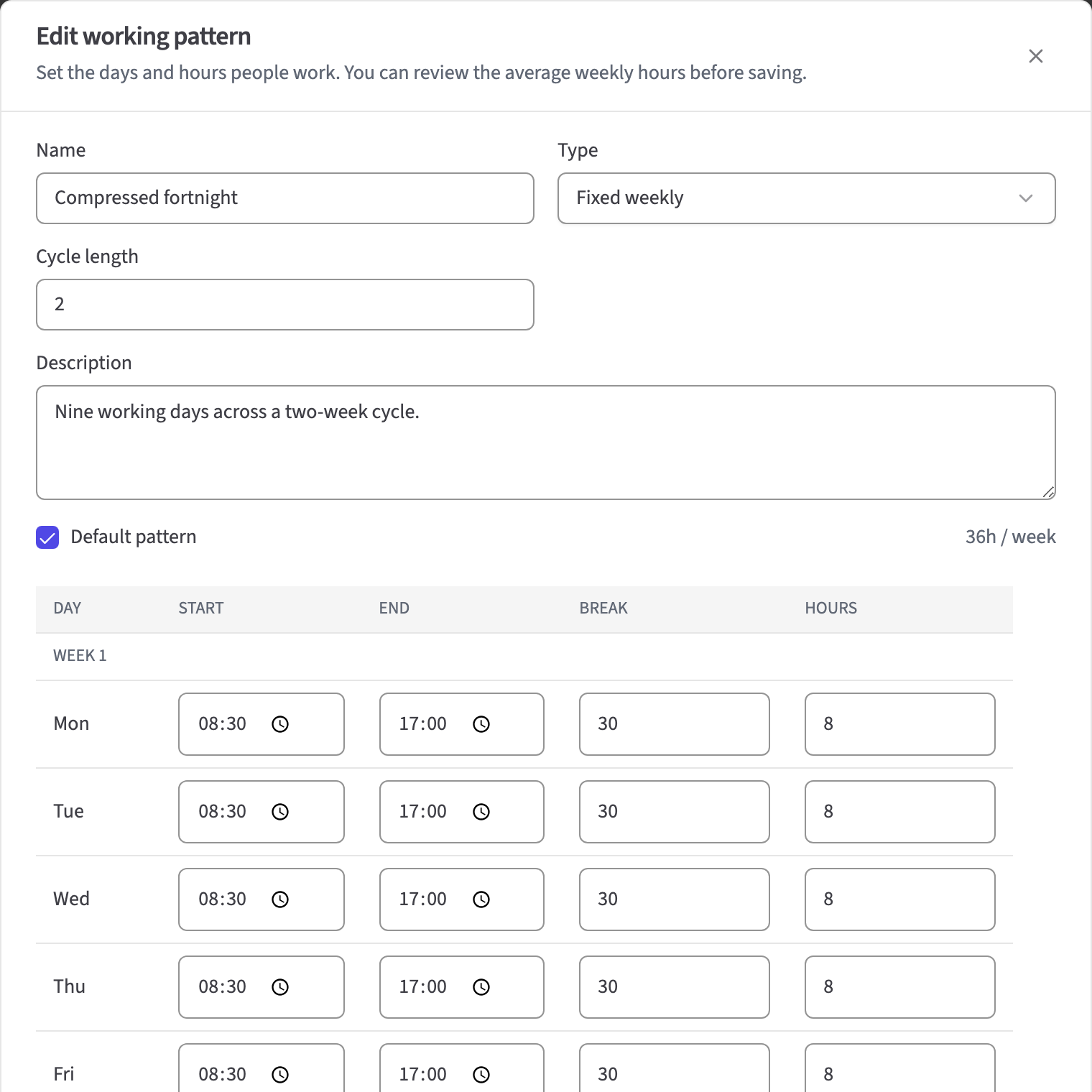
Record the week people actually work
Create a fixed, flexible or zero-hours pattern with a cycle of up to twelve weeks. Add daily hours and, where useful, start times, end times and unpaid breaks.
- Cycles from one to twelve weeks
- Daily hours and optional times
- Reusable organisation templates
Use the right schedule in leave calculations
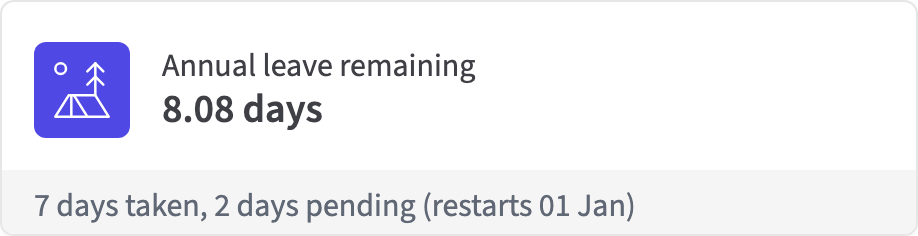
Assign the pattern from an effective date. Time Off uses the working days that apply to the request, while contracted hours and the full-time week supply current FTE for regular-hours allowance.
- Effective-dated person assignment
- Working-pattern-aware leave duration
- Current allowance, bookings and remaining balance together
Keep the same working facts across HR
Who's Away recognises regular non-working days, and the payroll-readiness CSV includes contracted hours, full-time hours and FTE. Scoped API access uses the same pattern records.
- Non-working days in Who's Away
- Contracted and full-time hours in payroll-readiness data
- Scoped REST access with protected writes
The contracted schedule behind everyday HR
Pattern library
- Fixed, flexible and zero-hours patterns
- One-to-twelve-week cycles
- Daily hours, times and unpaid breaks
Employee assignment
- Explicit assignment from an effective date
- Contracted and full-time weekly hours
- Current calculated FTE
Connected use
- Date-specific leave duration
- Non-working days in Who's Away
- Payroll-readiness fields and scoped API access
Check hours and leave with care
Questions about working patterns
What is a working pattern?
A working pattern is the repeatable schedule a person is expected to work. It records working days and hours and can also include start times, end times and unpaid breaks.
Can HollyHR handle fortnightly and multi-week patterns?
Yes. A pattern can repeat over one to twelve weeks. HollyHR uses the assignment date as the cycle anchor, so alternating and fortnightly schedules resolve the right week for each date.
How does a working pattern affect leave?
HollyHR uses the applicable working days for the dates in the request and saves the result with its working-pattern sources. Regular non-working days are not counted as leave.
How does HollyHR calculate current part-time allowance?
For regular-hours employees, HollyHR divides contracted weekly hours by the organisation's full-time weekly hours, then applies the current policy allowance multiplied by current FTE.
What happens when somebody changes hours?
Start the new assignment from its effective date so later leave uses the new schedule. The annual allowance is not yet blended automatically across the old and new FTE periods, so HR should review it.
Is Working Patterns a rota or time-tracking tool?
No. It records the expected contracted schedule used by core HR. It does not publish shifts, manage shift swaps, track attendance, capture clock-ins or calculate entitlement from actual hours worked.
Does HollyHR calculate zero-hours or irregular-hours entitlement?
Not from hours worked. HollyHR can record a zero-hours pattern, but it does not collect actual worked hours or calculate worked-hours entitlement for irregular-hours or part-year staff.
Can working patterns be accessed through the API or an export?
Yes, with defined limits. The beta API supports scoped working-pattern reads and writes. The payroll-readiness CSV includes current hours and FTE, while the organisation export does not yet contain the complete pattern and assignment history.
Start free with up to 10 active employees.
Bring your team over from a spreadsheet. There is no card, no sales call and no lock-in. For up to 10 active employees, everyday HR is free.