Onboarding

Give every new starter a clear path to day one.

Build the checklist once, launch it for each starter from their start date, and let the new person, their manager and HR each see exactly what needs doing. No spreadsheet, no fourth reminder email, no guessing whether the contract came back.

Reusable onboarding packsDue dates from the start datePersonal actions and live progressEvidence provided; HR verifies

What is employee onboarding software?

Employee onboarding software gives each new starter a repeatable journey from accepted offer into their first days at work. In HollyHR, an HR or System Admin creates a reusable pack of tasks and linked document requirements, gives steps owners and dates relative to the person's start date, then launches that pack for the new starter. The employee sees their own actions while HR and the selected manager can follow progress, overdue work and items that need attention.

The details are where onboarding tools usually cheat, so HollyHR keeps them honest. A document step reads its live status from Documents/Compliance — one source of truth, not a second tick box. Right to work is a proper two-part flow: the starter provides evidence, an authorised admin records the employer's decision. And operational steps organise the payroll, equipment and training work without pretending to provision those systems for you.

A good welcome, repeatable

Give the work a shape, an owner and a real date.

Build the common journey once, launch it per person, and everyone involved in the welcome sees what's moving — the starter most of all.

Reuse the plan

Create a company or organisation-unit pack from operational tasks, profile work, meetings, payroll, equipment, training, linked document requirements and a right-to-work pair. Publish it once and launch the same active pack for more than one starter.

Build dates from day one

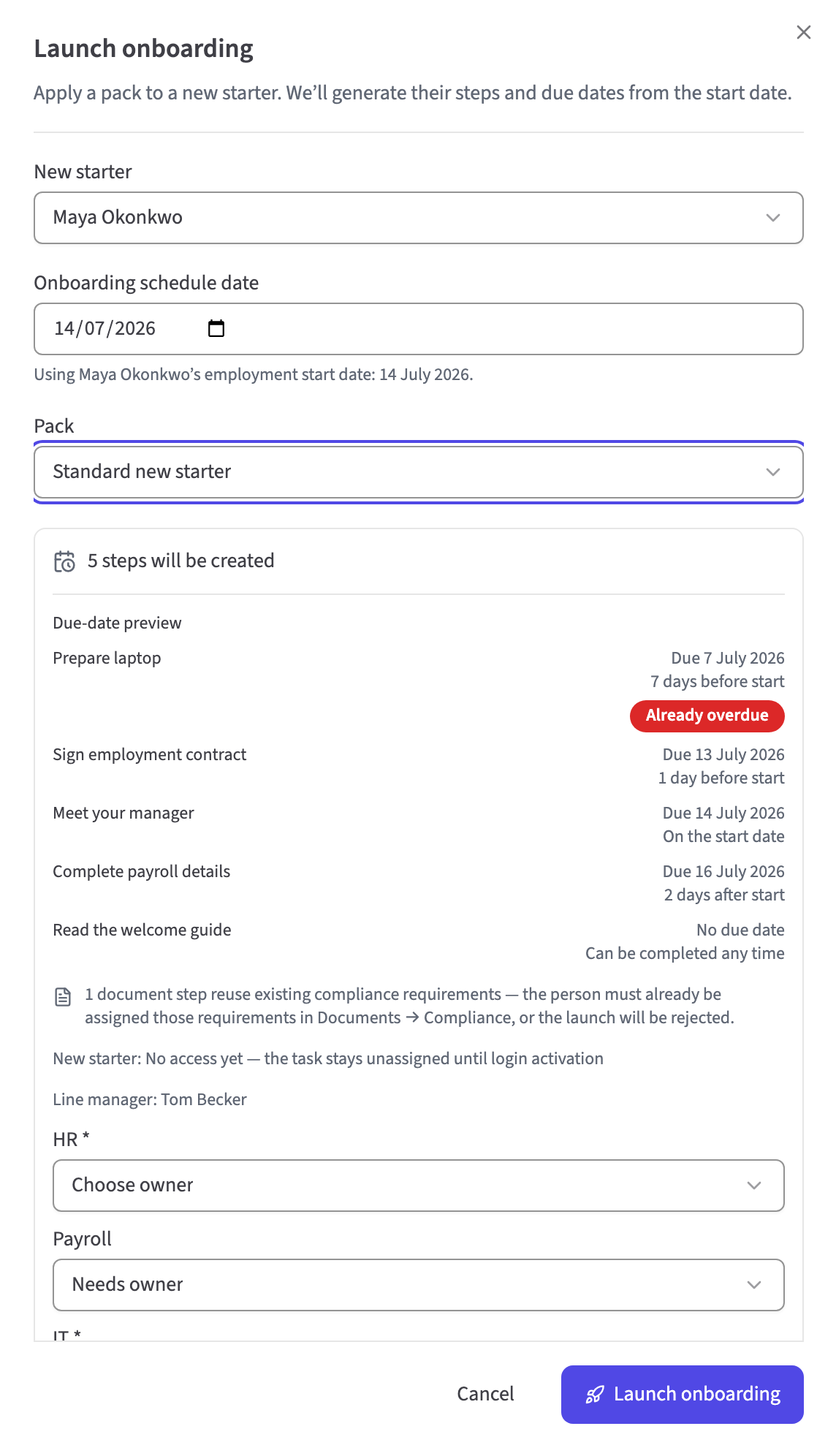
Give each step a whole-day offset before, on or after the person's start date. When HR launches the pack, HollyHR turns those offsets into dated journey steps, so a plan such as seven days before or five days after becomes a real date for that person.

Give the starter one action list

A new starter sees only their own onboarding items: plain tasks they can mark done, right-to-work evidence they can provide, and document obligations that take them to the existing Documents flow. Completed work stays separate from action needed.

See the work, not a vague percentage

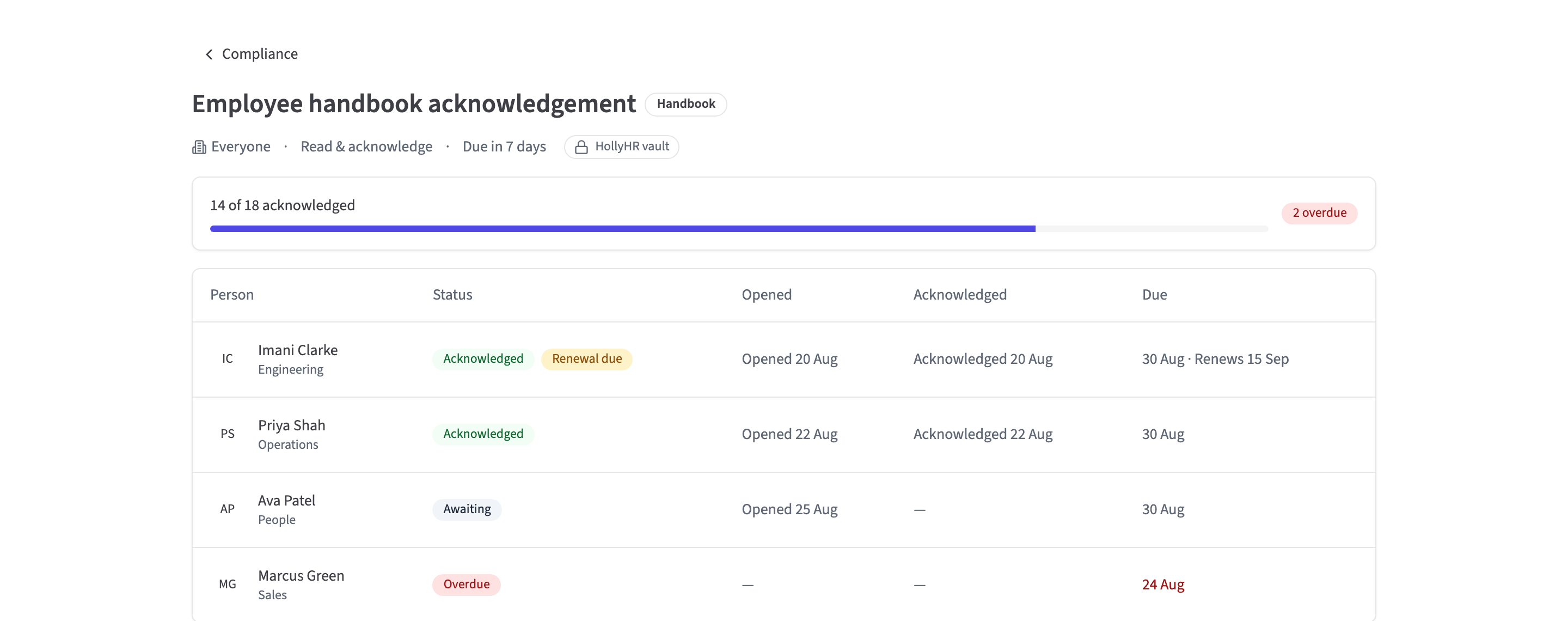
The organisation view shows each person's start date, selected manager, step owner, status and completion count, with overdue and needs-attention signals. Managers and task owners see journeys connected to them; HR and System Admins manage the organisation view.

Build once. Launch deliberately.

Turn one pack into dated work for the person.

Define the common steps, owners and offsets once. When HR launches the active pack for a selected starter, HollyHR resolves each date from their start date and keeps that journey on the version it began with.

Progress with a permission boundary

Show each person the view they can use.

HR and System Admins manage the organisation view. A selected manager or task owner sees journeys connected to them. The new starter gets their own actions—not the control panel or everybody else's welcome.

Evidence first. Employer decision second.

Do not turn right to work into an employee tick box.

The new starter provides the evidence. An authorised HR or System Admin reviews the same file and records Verified or Needs attention. HollyHR records that workflow; the employer remains responsible for performing a valid check.

One document state, not two tick boxes

Let Documents own the evidence.

A pack can link an existing compliance requirement. The employee acts in Documents, while onboarding projects the same acknowledgement or signature state into the journey instead of inventing a second version of completion.

What you get today

  • Create a reusable onboarding pack for the company or one organisation unit, with up to 80 typed steps
  • Add operational, profile, meeting, payroll, equipment and training tasks alongside linked document requirements and the right-to-work pair
  • Set required work and whole-day due offsets before, on or after the person's start date
  • Publish a new pack and manually launch an active pack for an active or invited same-organisation member, with an optional selected line manager
  • Create a dated per-person journey from the pack while keeping existing journeys pinned to the version they were launched from
  • Show HR and System Admins organisation-wide progress; show a selected manager or task owner only the journeys connected to them
  • Give the new starter a personal action list containing only the steps assigned to them
  • Track completion, overdue and needs-attention states without treating a percentage as legal or operational proof
  • Link document steps to an existing Documents/Compliance requirement and project its current obligation state rather than copying evidence or implying native e-signature
  • Let the new starter upload supported right-to-work evidence up to 10 MB, then let HR or a System Admin record Verified or Needs attention against that evidence
  • Add a future starter before day one, keep them out of the ordinary colleague directory until their start date, and optionally schedule their welcome email for 09:00 on that date
  • Prompt a signed-in employee to complete required profile fields while those fields remain missing

On the roadmap coming soon

  • Pack editing and journey lifecycleRetry-publishing a saved draft and confirmed archiving of draft or active packs are shipped. Editing or versioning an existing pack, and completing, cancelling or reopening a journey, are not.
  • Reminders and escalationsEmail and in-app reminders for upcoming, overdue and needs-attention work, with a named escalation policy. Today's due and overdue states are visible but do not send automatic nudges.
  • Rules-based launch and real integrationsAutomatically launch from a starter or audience rule, then connect payroll, identity and device providers. Today's audience is a pack label and every journey is launched manually.
  • In-place document actionsOpen, acknowledge and sign from the personal onboarding list when the underlying Documents workflow supports it. Today document items take the employee to Documents, and native e-signature is not shipped.
A clear product boundary

A well-run checklist—not a legal judgement or provisioning engine

HollyHR makes onboarding work visible and gives right-to-work evidence a proper employer-verification path. Your organisation still decides which checks are required, whether the evidence is acceptable and how payroll, pensions, accounts and equipment are actually provisioned.

  • Right-to-work workflow records evidence and the authorised employer decision; it does not perform the statutory check or give legal advice
  • Payroll, IT and equipment steps organise work but do not call provider systems or place orders
  • A linked document requirement and person state must already exist in Documents before a pack containing that step can launch
  • The employee opens or acts on linked document obligations in Documents; onboarding projects the resulting state
  • The starter marks their own plain tasks done in My onboarding; manager and admin views track progress rather than completing tasks on the starter's behalf
  • A pack's audience label does not automatically enrol future starters or launch journeys
  • Future starters default to invited, non-default access and stay hidden from ordinary-member directory, search, dashboard and Who's Away projections until their start date
  • An authorised creator can deliberately allow audited pre-start login, while selecting a manager or task owner intentionally gives that person access to the connected journey
  • Reminders, pack versioning and journey close/reopen are roadmap items (dated above), not shipped workflows

Questions people ask

What is employee onboarding software?

Employee onboarding software turns the work around a new starter into a repeatable, dated journey. HollyHR lets an HR or System Admin create and publish a pack, manually launch it for the person using their start date, give the starter their own action list and show HR or the selected manager how the work is progressing.

Does HollyHR have reusable onboarding checklists?

Yes — HollyHR calls them onboarding packs: operational, profile, meeting, payroll, equipment and training tasks, linked document requirements and the paired right-to-work flow. Publish once, launch the same active pack for every starter. Editing a published pack arrives with pack versioning (see the roadmap above).

Can onboarding tasks have owners and dates?

Yes. Steps belong to the starter, the selected line manager or the launching admin, and due dates are whole-day offsets from the start date — 'seven days before' becomes a real date the moment the journey launches. Payroll and IT are role labels that resolve to the launching administrator today; separately selected payroll and IT owners arrive with rules-based launch (see the roadmap above).

Can a new starter complete onboarding before day one?

HR can add the future starter and prepare or launch their journey before the start date. By default, the person has invited, non-default tenant access and an optional welcome email is scheduled for 09:00 on the start date. An authorised creator can instead make the audited Allow login choice, which enables pre-start access and sends the invite immediately; the starter can then sign in and complete only their own assigned work.

How does right-to-work onboarding work in HollyHR?

Add the paired right-to-work steps to a pack. The new starter can upload supported evidence of up to 10 MB directly to private object storage; an HR or System Admin then reviews that evidence and records Verified or Needs attention. HollyHR records the workflow and evidence reference, but the employer remains responsible for carrying out a valid check.

How do documents work inside onboarding?

A pack can reference an existing Documents/Compliance requirement. The target person must already have a matching requirement state before the journey launches. The employee opens or acts on that item in Documents, and onboarding projects the same document-obligation state instead of storing a separate completion flag or implying native e-signature.

Who can see a new starter's onboarding journey?

HR Admins and System Admins can prepare and manage future-starter onboarding. Before the start date, ordinary members cannot discover an invited future starter through the People directory or search, dashboard, Who's Away or active-roster projections. A line manager or task owner sees a journey only when HR deliberately connects them to it, and a starter with an authorised pre-start-login override can see only their own assigned items.

Does HollyHR send onboarding reminders automatically?

Not yet — reminders and escalations are on the roadmap above. Today the journey view makes due, overdue and needs-attention work visible at a glance, so the chase is one look rather than a spreadsheet audit.

How much does onboarding cost with HollyHR?

Onboarding is included in the core product. Free covers up to 10 active people, no card required; Standard is £2 per active person per month with no headcount band or cap. A future starter counts as an active profile from the day you add them, even while their access stays invited-only until the start date. Inactive profiles never count.

Free for your first 10 people

The whole core product, no card, no trial clock — with a broad self-service organisation export if you ever want to leave.

Related: Documents · People records · Who's away