Documents

Keep employee files with the right person. Make policy acknowledgement clear.

The contract lives on the person's record. The policy goes out to everyone with a due date and a real answer to 'who's actually read this?'. Two different jobs — HollyHR does both properly instead of blurring them into one magic library.

Up to 10 private files per uploadAudited 60-second attachment linksOpen before acknowledgeEligible files plus an honest manifest

What is HR document management software?

HR document management software keeps employment files against the right person's record and gives a team a controlled way to distribute shared documents such as policies. HollyHR handles those as two separate jobs today: profile documents can be uploaded privately or saved as HTTPS links, while a company document link can become a compliance requirement assigned to everyone, a department or one person, with an open-before-acknowledge record.

Keeping those two jobs separate is a feature, not a gap. An uploaded contract never silently becomes a company-wide requirement, and the compliance list only contains things someone actually assigned — so both surfaces stay trustworthy. Vendors that promise one all-in-one library usually deliver one confused one.

A place for the file. A record for the action.

Know where it is, and know who's acted on it.

Personal paperwork stays with the employee record. Shared policies get a scope, a due date and dated acknowledgement evidence. Clear access rules join the two.

File it with the person

Add up to ten contracts, certificates, payslips or other supported files at a time, each up to 10 MB, or save an existing HTTPS document link. Give each item a fixed document type, a useful name and an issue date so it is found from the employee record rather than an inbox search.

Open a private upload deliberately

Profile files sit in private storage — nothing public, ever. When someone with the right access opens one, HollyHR logs the access and issues an attachment-only download link that dies after 60 seconds. A leaked link is a dead link.

Turn a policy link into a dated action

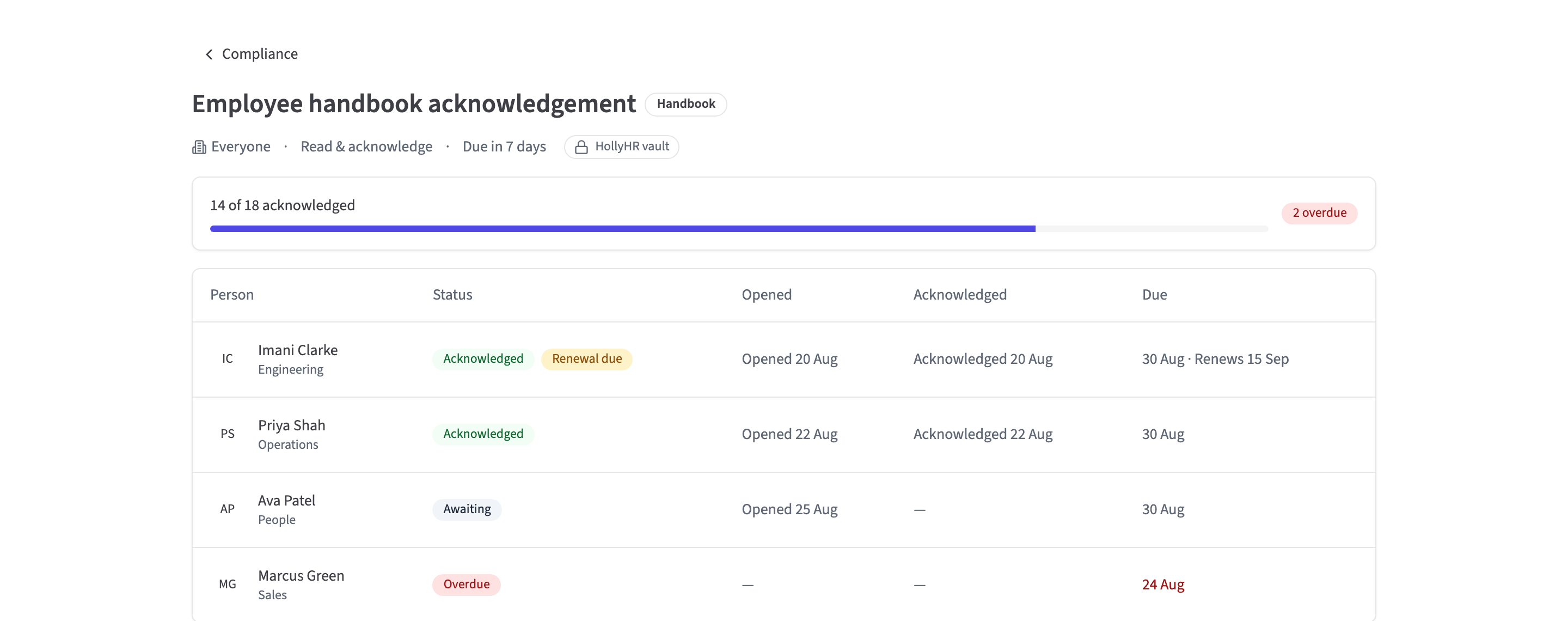
Create a requirement from a permitted HTTPS link, choose everyone, a department or one person, and set the due window. The employee must open the document before Acknowledge is enabled; HollyHR records who did both and when.

Leave with a usable, honest package

A System Admin export includes document metadata and the uploaded files (25 MB per file, 100 MB overall), with a manifest that says exactly what was included, what was skipped and why. No lock-in theatre — your files leave when you do; external links stay metadata because HollyHR does not own the remote file.

Two document jobs. Two honest paths.

Put the file in the right surface first.

Employee paperwork can be uploaded privately or saved as an HTTPS link on the person's profile. A company policy starts as a permitted HTTPS link, gains a scope and becomes a separate read-and-acknowledge requirement.

From assigned to acknowledged

Make “I've read it” a dated product event.

The assigned employee opens the document through HollyHR before the acknowledge action is enabled. HR and System Admins can then review current completion and the person-level evidence without calling a mutable link an electronic signature.

Access and portability, made specific

A permission boundary and a manifest beat a vague assurance.

Profile-file access follows a fixed role policy, the public API returns metadata rather than bytes, and the organisation export states which eligible uploaded files were included or skipped instead of promising the impossible.

What you get today

  • Upload up to ten employee-profile files at a time, each up to 10 MB, across supported PDF, Office, text, image and archive formats, with declared types checked against bounded byte/container structure before storage
  • Private file storage with public access blocked and audited, attachment-only 60-second download links after HollyHR checks access
  • Collision-proof storage keys, redacted lifecycle audit evidence and durable provider-deletion retries for uploaded profile files
  • External profile-document links limited to HTTPS URLs that pass HollyHR's address and host checks
  • Fixed employee document types, custom names and issue dates on the live profile
  • Employees manage their own profile files; HR and System Admin manage organisation-wide; managers do not get direct-report profile files
  • Company-document requirements scoped to everyone, a department or one person, with open-before-acknowledge evidence and audited compliance events
  • Current requirement status for acknowledged, outstanding, expiring-soon and blocked work, with managers able to read their own and current direct reports' states
  • System Admin organisation export with document metadata, available files within the stated limits, and an included/skipped manifest
  • Per-person subject-access export with document metadata and an explicit document-binary exclusion
  • Read-only REST API for active-member profile-document metadata; no file bytes, download links or compliance records
  • Uploaded file bytes in AWS London and primary metadata in HollyHR's EU database region; linked files stay with the customer's provider

On the roadmap coming soon

  • One document lifecycleUse an uploaded profile or company file directly as a requirement, expose profile expiry properly, preserve version context and surface renewal after acknowledgement instead of treating the two stores as one today.
  • Reminders and renewal workEmail and in-app reminders, owners and a proper renewal queue. Today's dashboard can show current requirement state; it does not run a complete reminder workflow.
  • Cloud sources and live e-signatureReal consent, file pickers, sync and repair for Google Workspace and Microsoft 365, plus provider-backed e-signature. HollyHR does not present today's internal records as connected integrations.
  • Malware scanning and content hardeningA quarantine scanner, content disarm/reconstruction and deeper active-content inspection. Today's byte/container checks reject mismatched, malformed and macro-bearing Open XML files, but they are not antivirus.
A clear product boundary

Document records, not a contract-workflow suite

HollyHR gives a small team a dependable place for employee files and a measurable open-and-acknowledge path for linked company documents. Choose a broader document or contract platform today if the missing workflow is essential.

  • Profile files and company compliance requirements are separate surfaces
  • No native company-policy upload from the compliance wizard today
  • No automatic reminder delivery or complete profile-document expiry inventory
  • No immutable document version or content digest bound to an acknowledgement
  • No live cloud-provider picker, sync or e-signature provider workflow
  • No malware scanner, quarantine service or content-disarm pipeline
  • No custom per-file access rule or HR-only profile file hidden from its employee

Questions people ask

What files can I upload to HollyHR?

You can upload up to ten files at a time, each up to 10 MB. Supported types include PDF, Word, Excel and PowerPoint files, text and CSV, JPG, PNG and GIF images, plus ZIP and RAR archives. HollyHR also lets you save an external profile-document link when the URL uses HTTPS and passes its host checks.

Who can see an employee's profile documents?

The employee manages their own. HR and System Admins manage the organisation's. Managers get no automatic access to a direct report's profile files — deliberately. Compliance visibility is separate: its read model covers a manager's own and current direct reports' requirement states, and the manager page today leads with their personal action list.

How are uploaded employee documents protected?

Private AWS London storage with public access blocked, structural file-format verification before anything is stored, collision-proof keys, audited access, and download links that expire after 60 seconds. One honest limit: these checks verify structure, they are not antivirus — a quarantine scanner is on the roadmap above.

Can HollyHR prove somebody read a company policy?

It records that the employee opened the document before Acknowledge became available, who acknowledged and when, and audits the trail. What it doesn't yet do is freeze a copy of the document itself — so for signature-grade evidence on a document that changes, keep a versioned copy until document versioning ships (roadmap above).

Does HollyHR track document expiry and send reminders?

A company requirement can carry an expiry date and active person states are evaluated when the compliance data is read, including expiring and expired states. That does not cover ordinary profile documents, acknowledged and waived states remain stable, and automatic email reminders are not shipped. A unified renewal workflow is on the roadmap.

Does an organisation export include the document files?

It includes available uploaded binaries when each file is no more than 25 MB and the export remains within its 100 MB binary limit. A manifest records which uploaded files were included or skipped and why. External links remain in document metadata because HollyHR cannot export a remote provider's file bytes.

Can integrations read employee documents through the API?

An API key with documents:read can list active-member profile-document metadata such as the person, name, category, file type, size and timestamps. It does not return file content, download links or the separate compliance records.

Does HollyHR include e-signatures or cloud document sync?

Not yet — provider-backed e-signature and Google/Microsoft document sync are roadmap items above, and nothing on this page dresses internal foundations up as live integrations.

Free for your first 10 people

The whole core product, no card, no trial clock — with a broad self-service organisation export if you ever want to leave.

Related: People records · Onboarding · Data export